
Topical map
A topical map built from what Google ranks, not from guesses
Planditor's topical map groups keywords by the results they share, decides which ones deserve their own page, and draws the whole site so you can see what is live, what is in progress and what is missing.
- Keywords grouped by shared top-10 results
- Small keywords become sections and FAQs, not thin pages
- A Map view your whole team can read
How the map is built
- 01
SERPs first
Each search is read in the target country: the top 10, small and big sites, People also ask and related searches.
- 02
Group by overlap
Two keywords that share three or more of the same top-10 pages are one page; different results mean different pages.
- 03
Own page or section
A page is planned only with real demand or a ranking page of its own; everything else joins the closest page as an H2 or FAQ.
- 04
Every search gets a home
The Our page column on every SERP row says which page covers it, or why it is skipped.
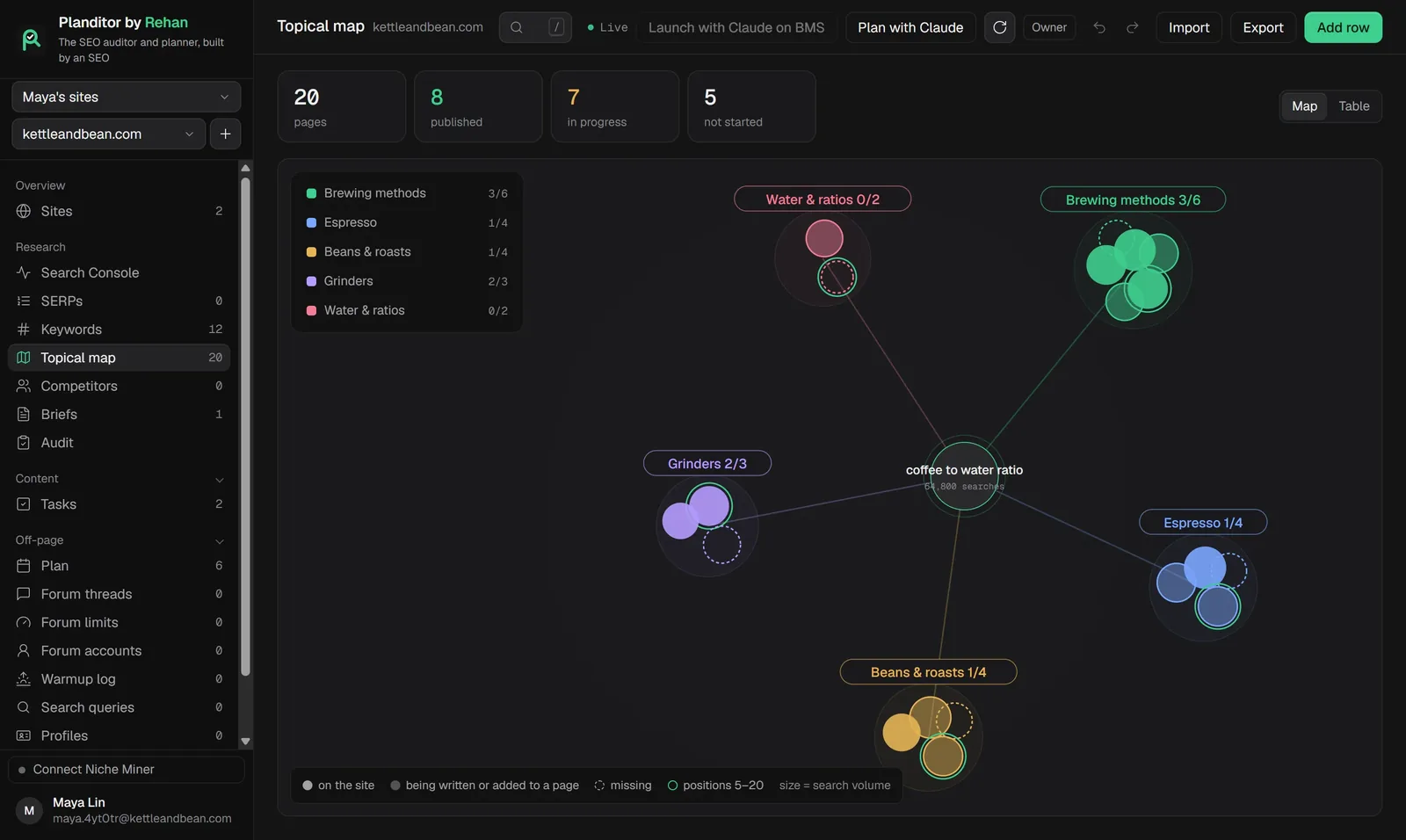
The Map view
Each topic is a cluster around the main page, each page a circle sized by its search volume. Solid circles are on the site, dashed ones are missing, and a ring marks pages with Search Console queries at positions 5 to 20. Switch to Table for the rows.
Do you have a topical map generator?
Not a one-click one. Planditor's map comes from reading the real results for your niche, either by you or by Claude with Plan with Claude. It takes longer than a generator and gives you a map you can defend.
Questions
Build your first topical map
Free for two sites. Every feature is in the free plan.